
reverse-engineering
The reverse engineering process is just the reverse process of the binary generating process.
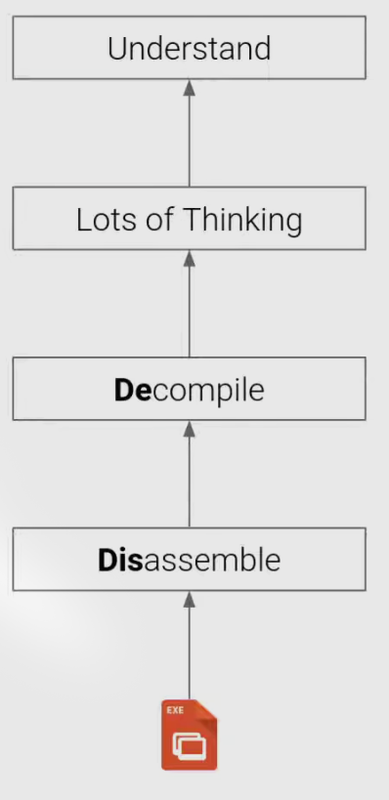
Binary Files
ELF stands for Executable and Linkable Format.
ELF Header
ELF headers contains general information about the binary.
Actually the ELF Headers are defined in /usr/include/elf.h file as ELFxx_Ehdr
1 |
|
ELF Program Headers (Segments)
Program headers defines the segments which should be loaded into memory
This is a view to see how actually the data are stored in the file, or how the file is loaded into memory when running.
Segments break down the structure of an ELF binary, into suitable chunks to prepare the executable to be loaded into memory, they are needed on link-time.
ELF Section Headers
This is a different view of the ELF with useful information for introspection, debugging, etc.
Important sections
.text: the executable code of your program.
.plt and .got: used to resolve and dispatch library calls.
.data: used for pre-initialized global writable data (such as global arrays with initial values)
.rodata: used for global read-only data (such as string constants)
.bss: used for uninitialized global writable data (such as global arrays without initial values)
Symbols
Binaries (and libraries) that use dynamically loaded libraries rely symbols (names) to find libraries, resolve function calls into those libraries, etc.
further reading:
a blog
Interacting with ELF
gcc to make your ELF.
readelf to parse the ELF header.
objdump to parse the ELF header and disassemble the source code.
nm to view your ELF’s symbols.
patchelf to change some ELF properties.
objcopy to swap out ELF sections.
strip to remove otherwise-helpful information (such as symbols).
kaitai struct to look through your ELF interactively.
Linux Process Loading
See course video
Intro
For an example, if we are typing a command in linux command line:
2
......
Here the execution of cat has some period:
- A process is created.
- Cat is loaded.
- Cat is initialized.
- Cat is launched.
- Cat reads its arguments and environment.
- Cat does its thing.
- Cat terminates.
Every Linux process has a bunch of attributes:
- state (running, waiting, stopped, zombie)
- priority (and other scheduling information)
- parent, siblings, children
- shared resources (files, pipes, sockets)
- virtual memory space
- security context
- effective uid and gid
- saved uid and gid
- capabilities
A process is created
We use syscall fork or clone to create a clearly exact copy of the calling process: the child process.
Later the child process usually uses the execve syscall to replace itself with another process
example:
- you type
/bin/catin bash - bash
forks itself into the old parent process (itself) and the child process. - the child process
execves/bin/cat, becoming/bin/cat.
Cat is loaded
Before anything is absolutely loaded, the kernel checks for executable permissions.
If a file is not executable, execve will fail.
And then there is some different situations, where the things actually loaded is different.
What to load
To figure out what to load, the linux kernel reads the beginning of the file (i.e., /bin/cat), and makes a decision:
- If the file starts with
#!, the kernel extracts the interpreter from the rest of that line and executes this interpreter with the original file as an argument. - If the file matches a format in
/proc/sys/fs/binfmt_misc, the kernel executes the interpreter specified for that format with the original file as an argument. - If the file is a dynamically-linked ELF, the kernel reads the interpreter/loader defined in the ELF, loads the interpreter and the original file, and lets the interpreter take control.
- If the file is a statically-linked ELF, the kernel will load it.
- Other legacy file formats are checked for.
And, these can be recursive
Dynamically inked ELFs: the loading process
The program and its interpreter are loaded by the kernel.
The interpreter locates the libraries.
In this step, there are some interesting stuff.
- LD_PRELOAD environment varriable, and anything in /etc/ld.so.preload
- LD_LIBRARY_PATH environment variable (can be set in the shell)
- DT_RUNPATH or DT_RPATH specified in the binary file (bath can be modified with patchelf)
- system-wide configuration (/etc/ld.so.conf)
- /lib and /usr/lib
The interpreter loads the libraries.
- these libraries can depend on other libraries, causing more to be loaded
- relocations updated.
Cat is initialized
Every ELF binary can specify constructors, which are functions that run before the program is actually launched.
For example, depending on the version, libc can initialize memory regions for dynamic allocations (malloc/free) when the program launches.
And you can specify your own:
1 | __attribute__((constructor)) void haha() { |
Demo: LD_PRELOAD and constructors could work together to get some interesting effects.
Cat is launched
See course video
A normal ELF automatically calls __libc_start_main() in libc, which in turn calls the program’s main function.
Cat reads its arguments and environment
1 | int main(int argc, void **argv, void **envp); |
Cat does its thing
Using library functions.
The binary’s import symbols have to be resolved using the libraries’ export symbols
Interacting with the environment
- Syscall
Almost all programs have to interact with the outside world. This is primarily done via system calls. Each system call is well-documented in section 2 of the man pages (i.e., man 2 open) - Signals
Signals pause process execution and invoke the handler.
Handlers are functions that take one argument: the signal number.
Without a handler for a signal, the default action is used (often, kill).
SIGKILL (signal 9) and SIGSTOP (signal 9) cannot be handled. - Shared memory
Another way of interacting with the outside world is by sharing memory with other processes.
Requires system calls to establish, but once established, communication happens without system calls.
Easy way: use a shared memory mapped file in /dev/shm.
- Syscall
Cat terminates
Processes terminate by one of two ways:
- Receiving an unhandled signal.
- Calling the exit() system call: int exit(int status);
All processes must be “reaped”:
- after termination, they will remain in a zombie state until they are wait()ed on by their parent.
- When this happens, their exit code will be returned to the parent, and the process will be freed.
- If their parent dies without wait()ing on them, they are re-parented to PID 1 and will stay there until they’re cleaned up.